Showing posts with label home depot. Show all posts

Home Depot In-App Augmented Reality

Home Depot rolled out a nifty feature inside their smartphone app. It allows users to imagine finished products in a space. It's also not easy to find and it certainly doesn't reside in the Tools section of the app, even though it could.

Let's say you are shopping for a replacement sink for the kitchen and you find one in the app, simply select the option for "See this in your home" in the product photo display. The rollout of this feature is limited to certain product groups. You cannot, for example, visualize the fit of the 3-person Infrared Sauna in your home using the app.

The only problem is that it only shows the faucet part, and not it's accompanying base. It would be a hassle for the homeowner to find that the base is what doesn't fit in the current sink configuration. Unless you have a diamond drill bit set, drilling the holes yourself through a porcelain sink might be difficult.

There are other tools in the app that you might not be aware of. Anyone could say "of course, that is obvious" but it really is not so obvious. The ones that I really liked are digital Caliper and the Nut & Bolt Finder, where you simply put the object you are trying to match onto your smartphone screen then using your fingers to drag a ruler and the app shows an estimate of the nut or bolt size. Really nifty. Especially when you go to any hardware store for replacement parts and the store assistant says, "What size are you looking for?" and then shows the aisle filled with shelves and boxes of a lot of nuts and bolts.


Home Depot In-App Tool: Nut & Bolt Finder


Home Depot: A bad UX update

Well, that could have gone better. It seems as though HomeDepot.com has rolled out of a site navigation redesign and somewhere along the way, zip codes and local stores has gotten all f'd up. Maybe their license for the 3rd party vendor that handles it expired or something. Not only do my bookmarked local store pages go somewhere other than the local store page, but when I try to find my local store in southwest Washington.

If I am searching for a store in Vancouver, WA, don't you suppose that the first listing should be a store in Vancouver, WA; instead, Home Depot's store listing service shows you the closest store to the map location of "Vancouver, WA", in this example, is Jantzen Beach, OREGON.

WTF. I can't even set a local store. It keeps defaulting back to Beaverton, OR. 

Here's what I'm doing:

Go to: HomeDepot.com
Click onto: Store Finder or Change Store
Input: local zip code or city/state

You'd think that UX would be this simple.

What the nav system spits out for results, isn't even correct! Ok. I think I picked my store. It even shows up in green. The link for In-Store Layout is just a PDF of the store's layout. This link mapping is fine and it brings up the right store and store label.
Home Depot store finder - My Store will appear in Green when selected.
You think that session cookies would be in place, but sadly, they are not.

However, after selecting a location as "My Store", click onto the link for "Local Ad". 

Here's what I get:

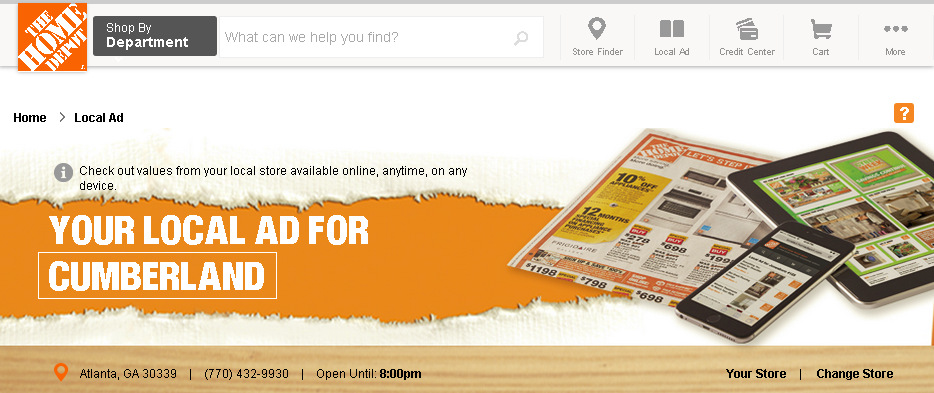
Local Ad Link Error: The page that loads AFTER choosing a store
from the Store Finder, and selecting LOCAL AD

How do you f--- up with Atlanta's Cumberland store showing up? A bad UX update. That's how.

And then, when I use the top page nav, guess what? The page forgets about my store, and navigates me to.. wait for it.. Beaverton, OR. This is probably because my browser thinks I am in Portland. But, I just told the website that my local store is E Vancouver.

HomeDepot.com Home page AFTER selecting my local store

But wait, there's more! It looks to me like these are two entirely different applications and they are not talking to each other all that well: Store Finder and Local Ads. I can tell these are separate apps when I look at their mapping directions. My store is still green lit, but the map still wants to navigate to Beaverton.

Home Depot Black Friday Ad - In Spring?

Recycling of the November/Holiday Winter ad pricing theme? Poor ad planning? No one running their email marketing department? It is rather curious why any retailer would use the Black Friday phrase in a season other than after Thanksgiving day. Even the US Post Office knows that Mother's Day weekend is the busiest parcel shipping "season", which outpaces Black Friday. What do you think? 
2014-04-03 Home Depot Spring Ad

Home Depot: Gardening Club News

Home Depot's Gardening Club newsletter has always been a favorite of mine. This is where regional news really comes into play and why regional targeting of this type of content marketing really works. When I lived in California, it was sunny nearly all year and the overnight lows really never got below 40 degrees F. In the Pacific Northwest where we can have hail and snow as late as April, it's nice to see that this newsletter is aware of that and makes suggestions as to what can be planted at this time. It's a really good resource for both new and current subscribers. There's a lot going on in this basic spring email, and it is all relevant to the store, the brand, and the customer.

2014-02-19, Home Depot Garden Club email