Lowes.com Default Store Local Ad

The other top competitor in the Home Improvement space is Lowes. I thought I'd take a peek at their site nav as well between what the site thinks is my local store (based on browser history) and what happens when I try to look at the local ads.

Lowes.com - Default Store Location Based on Browser
As it turns out, there are no local ads for the default local store-based-on-browser history and an interstitial message briefly shows up saying there are no ads for the default local store before redirecting to the default local store ad, in Lowes' case, is a store in North Carolina.

Lowes.com - Weekly Ads of the Browser-Based Location
As you can see in this example, Lowes doesn't have their act together either. If you really wanted to rollout a national ad campaign, you should have a national ad and then add-on with whatever the region dictates, in terms of plants appropriate to the region's season and climate zones.

Home Depot: A bad UX update

Well, that could have gone better. It seems as though HomeDepot.com has rolled out of a site navigation redesign and somewhere along the way, zip codes and local stores has gotten all f'd up. Maybe their license for the 3rd party vendor that handles it expired or something. Not only do my bookmarked local store pages go somewhere other than the local store page, but when I try to find my local store in southwest Washington.

If I am searching for a store in Vancouver, WA, don't you suppose that the first listing should be a store in Vancouver, WA; instead, Home Depot's store listing service shows you the closest store to the map location of "Vancouver, WA", in this example, is Jantzen Beach, OREGON.

WTF. I can't even set a local store. It keeps defaulting back to Beaverton, OR. 

Here's what I'm doing:

Go to: HomeDepot.com
Click onto: Store Finder or Change Store
Input: local zip code or city/state

You'd think that UX would be this simple.

What the nav system spits out for results, isn't even correct! Ok. I think I picked my store. It even shows up in green. The link for In-Store Layout is just a PDF of the store's layout. This link mapping is fine and it brings up the right store and store label.
Home Depot store finder - My Store will appear in Green when selected.
You think that session cookies would be in place, but sadly, they are not.

However, after selecting a location as "My Store", click onto the link for "Local Ad". 

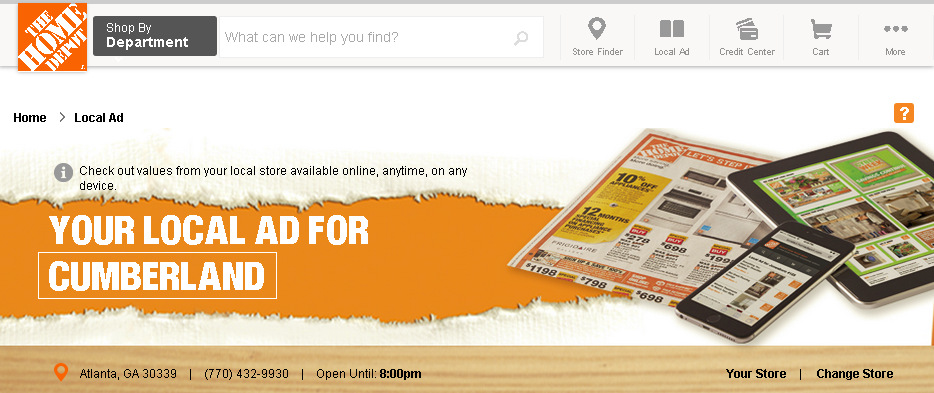
Here's what I get:

Local Ad Link Error: The page that loads AFTER choosing a store
from the Store Finder, and selecting LOCAL AD

How do you f--- up with Atlanta's Cumberland store showing up? A bad UX update. That's how.

And then, when I use the top page nav, guess what? The page forgets about my store, and navigates me to.. wait for it.. Beaverton, OR. This is probably because my browser thinks I am in Portland. But, I just told the website that my local store is E Vancouver.

HomeDepot.com Home page AFTER selecting my local store

But wait, there's more! It looks to me like these are two entirely different applications and they are not talking to each other all that well: Store Finder and Local Ads. I can tell these are separate apps when I look at their mapping directions. My store is still green lit, but the map still wants to navigate to Beaverton.

Ad-hoc Flyers

This is probably one of the silliest things I have ever done while on the road at a tradeshow. I created a flyer based off a Pardot landing page. Then had it printed overnight and ready for pickup at a convention center's FedEx Office. It's a tad expensive to print flyers like this, but in a pinch it will do.
Landing Page as a Booth Flyer?


Event-Tracking.com

Still looking under the hood, but at referral traffic.

The usual suspects are there: feedly, social sharing, etc.

Except, this one:


612 visits of the 865 MTD (70% of total blog traffic) or so are attributed to this referral page.

It suggests that something is terribly amiss with the conversion from classic GA to universal GA, or with my inept implementation of the universal GA javascript on my various blog properties.

/sigh

Google Organic Keywords

This blog has had unusually higher traffic than normal (>800 pageviews this month), so I thought I'd peek under the hood to see what was up with that.

And, I found this:
[img] Google Analytics Reporting - organic keyword search

Someone please explain how that could possibly be a search string that ends up at my blog.

Nag or Nurture

I recently was subjected to a very aggressive call from a sales rep of a marketing automation solutions provider who denied knowledge any communications that their marketing team sent out; and during the call it was suggested that I should unsubscribe from their marketing materials if I wasn't interested. Clearly not a thought leader in marketing automation, just another tool in the shed.

IKEA Newsletter

Today I signed up for IKEA's customer newsletter...as an 120-year old person. Seriously! That's the earliest birth year (1895)  that was offered on their sign-up page. It's hard to imagine a 120-year old putting together anything from IKEA. It was the lengthiest, multi-page sign-up I have seen from a consumer catalog company.
IKEA newsletter sign-up, birth year start
IKEA newsletter sign-up, birth year end
It could be that when the e-newsletter sign-up page was first produced, back at the dawn of the commercial internet, 1895 was a possible year for a date of birth. But then, there is also a top range part of the birth year and for IKEA, it's 1997 (or you'd be turning 18 in 2015). It begs the question.. why not just have birth month and birth day like most consumer companies? Why would you target a specific demographic like 18-120 yrs old. 

I'll have to see if I can change my birth month from December to something earlier in the year like July to see if they have a birth year-specific marketing campaign. It would be really surprising to get a "happy 121st birthday!" note from IKEA as a result of this albeit flawed email newsletter sign-up form.